EVO EVO 2.0.0.135 — Closed Beta
Release Notes:
UI Rework
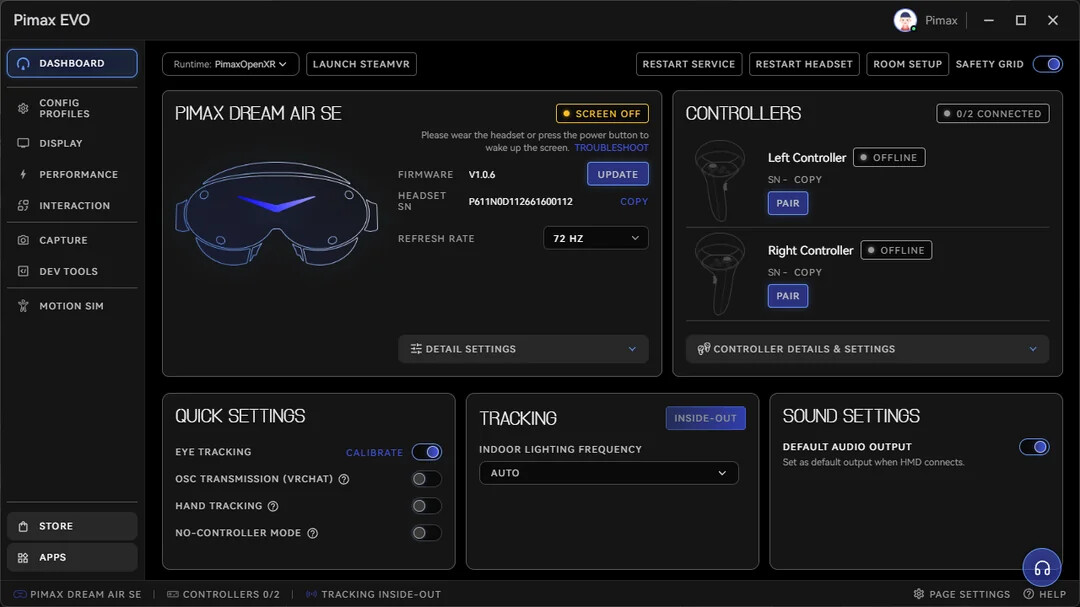
Settings and features have been reorganized into clearer categories, with a new dashboard for device status and commonly used options.
Less time searching through menus, faster access to the settings you need.
Configuration Profiles
Save complete sets of display, performance, and interaction settings as reusable profiles.
Profiles can be named, described, exported, imported, and adjusted for different games or use cases.
PVRM
Flat-screen PC games can now be displayed inside the headset on a virtual screen.
- Select the game window
- Calibrate the center
- Look around by moving your head
- Continue controlling the game with an Xbox controller
PVRM keeps the original game experience and does not convert it into native VR.
SystemUI Window Persistence
Selected SystemUI windows can now keep their position, size, and orientation when reopened during the same session.
Useful for charts, telemetry, reference windows, chat, and other frequently used panels.
Download: https://staticappstore.pimax.com/p/client/zip/1789204276224/PimaxEVOSetup_Release_ToC_Online_V2.0.0.135_202609121608.exe
Discord
https://dlappstore.pimax.com/release/Pimax_EVO/PimaxEVO/PimaxEVOSetup_Release_ToC_Online_V2.0.0.148_202610201607.exe
Release Notes
New Features & Improvements
1. User Interface
- Redesigned the client UI and reorganized features.
- Grouped display, performance, rendering, interaction, and spatial settings into clearer categories.
- Added a new default Dashboard showing headset connection status, device info, and frequently used settings.
2. Profiles
- Added support for saving display, performance, and interaction settings as profiles.
- Added custom names and descriptions for profiles.
- Added profile import and export for backup and sharing.
- The default profile now keeps your most recent settings changes.
3. PVRM (Flat-Screen VR Simulation)
- Added support for displaying select traditional PC games in the headset.
- Head movement can now control the in-game camera direction in compatible games, with an option to recenter the view.
- Added Xbox controller support for game input
Note: PVRM does not convert flat games to native VR. Compatibility depends on each game’s camera controls and input methods.
4. System UI
- Added the ability to save window position, size, and orientation.
- Saved layouts are restored when System UI is closed and reopened within the same session
Known issue: layouts are not restored after the client is restarted.
5. General
- Improved video recording.
- Changed which settings are available in Open Ports mode.
- Refined UI layouts, interaction details, and system messages.
6. Bug Fixes
- Fixed FOV cropping not working correctly in some cases
- Fixed the pinning feature in the Application Library
- Fixed the login screen showing Chinese text in the English client
- Fixed various UI display and localization issues
- Fixed navigation links to help documentation and community pages
7. Update Rollout
This update will roll out gradually to all users over the next two weeks. The schedule may change based on performance and feedback
Thank you to everyone who participated in EVO testing and shared feedback. We will continue improving software stability, compatibility, and the overall user experience.
You could join the Discord server to get the download link.
Pimax EVO Team